Software Option for LUSAS
Bridge Plus
Rail Track Analysis
Use the LUSAS Rail Track Analysis software
option to carry out track-structure interaction analysis to the
International Union of Railways Code UIC 774-3 and to the relevant
sections in Eurocode 1. Automatically build models from data
defined in Excel spreadsheets and quickly produce results in
spreadsheet or LUSAS results file formats. Because of the nature of
the analysis, the Nonlinear software option must also be accessible.
Modelling to International Union
of Railways Code UIC 774-3
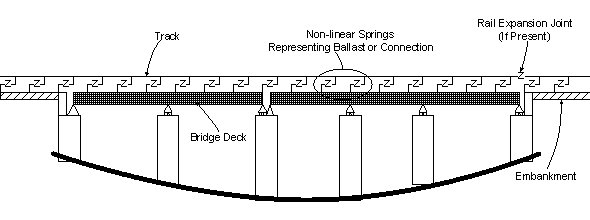
The UIC 773-3
Structural System
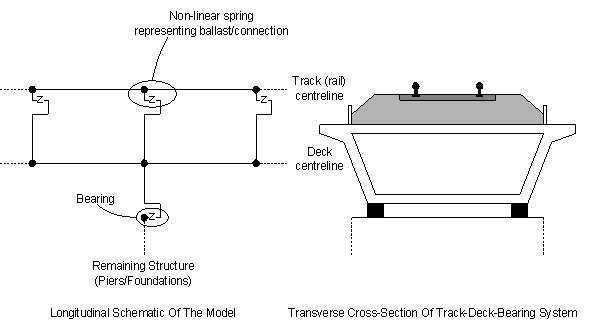
UIC 773-3
Track/Deck Modelling
Overview
High Speed and Light Rail projects
require modelling of the interaction of the track with respect to any
supporting bridge structures to ensure that the effects of temperature
and train loading is within specified design limits. To accurately
assess these track-structure interaction effects nonlinear analyses
are required to investigate thermal loading on the bridge deck,
thermal loading on the rail if any rail expansion devices are fitted,
and vertical and longitudinal braking and/or acceleration loads
associated with the trainsets. Ballasted or ballast-free tracks may
need to be considered.
Modelling in LUSAS
Build 3D track and bridge
interaction models automatically from geometric, material property,
and loading data specified within a spreadsheet using conventeint SI
or US uinits. As per UIC774-3, a
user-specified element length is used to define the longitudinal
embankment and bridge features.
-
Define both thermal
loading to the track and train loading due to acceleration and
braking forces.
-
Include rail clips,
ballast movement, bearings and pier stiffnesses in the analysis
model, as required.
-
Consider one train
crossing one or more structures, or multiple
trains crossing the same structure on mixed decks / ballast.
-
Train
loads are permitted outside the extents of the model, allowing
long trains to be passed over structures without having to
have excessively large embankments to model the correct arrival
and departure of the trainset from the structure.
A key feature of the LUSAS Rail Track
Analysis software option is that it automatically updates the material
properties associated with the track/structure interface based upon
the position of the train or trains crossing the bridge.
|
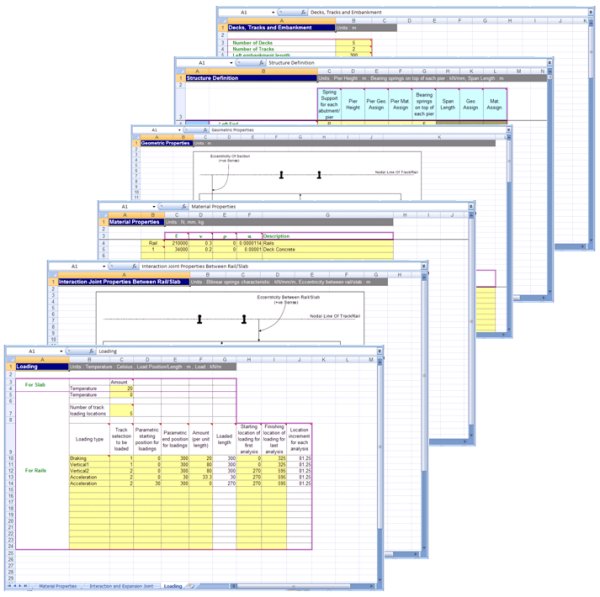
Spreadsheet
input data

Complete
embankment and viaduct model built by LUSAS
|
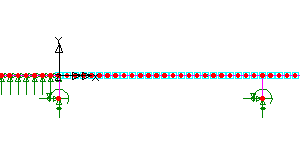
Enlarged
view of first span |
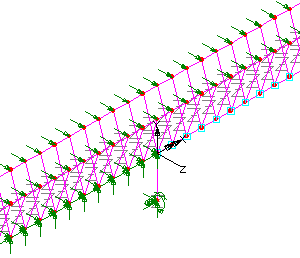
Exploded
isometric view of part of the model showing embankment
support and the beginning of the first span |
|
Analysis
Consider deck temperature loading in
isolation for subsequent analysis of multiple rail configurations, or
carry out a full analysis considering the combined temperature in the
deck and rail loading. Because the response of the ballast and/or track restraining clips is nonlinear
a nonlinear analysis always needs to be carried out. For
a complete rail track assessment, dynamic effects caused by the
passage of trains that affect the structure itself should also be
considered.
Results available
Produce results automatically in Excel
spreadsheet or standard LUSAS results file format. Envelope results
either inside Excel or by specifying user-defined load combinations
inside LUSAS.
Viewing results in
Excel
Within the Excel results spreadsheet,
separate worksheets contain results for specific areas of interest.
These include:
- Raw results data in summary, graph and tabular form for each track and deck component
- Envelopes of raw track and deck data in summary, graph and tabular form for combinations of temperature and trainset rail loading
- Tables of railbed displacements
- Tables of longitudinal reactions
- Tables of rail stress values.
The three latter tables provide key
results in summary form and allow the quick determination of which
analysis is causing the worst effects for each of the checks that need
to be carried out to the UIC774-3 code. Some example results
worksheets follow.
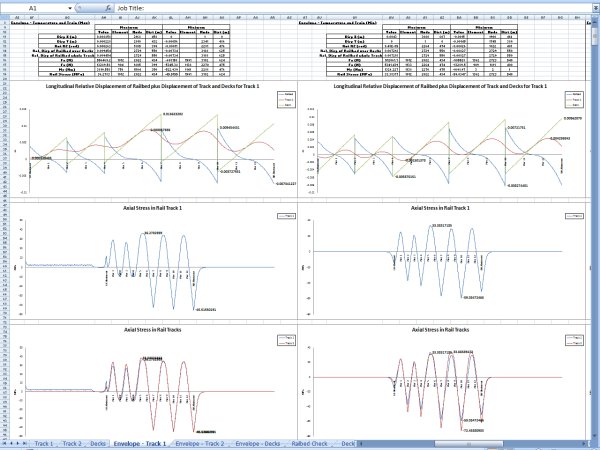
Envelope of axial
stresses in a rail track
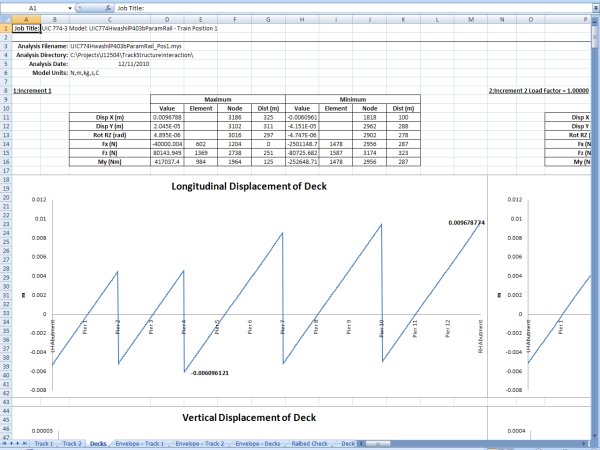
Extract of Deck
worksheet showing longitudinal displacement of deck
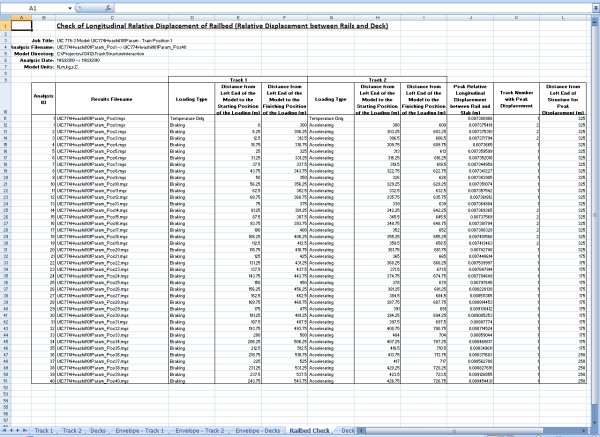
Table of relative
displacement of Railbed (relative displacment between rails and
deck)
Viewing
results in LUSAS
Using
LUSAS a variety of similar graphs, tabular listings and results plots
can be obtained to permit checking of most key values against UIC774-3
code, but the creation and viewing of results in the Excel spreadsheet
is superior in that it
provides automatic enveloping, summaries and graphing of the key
results for each loadcase.
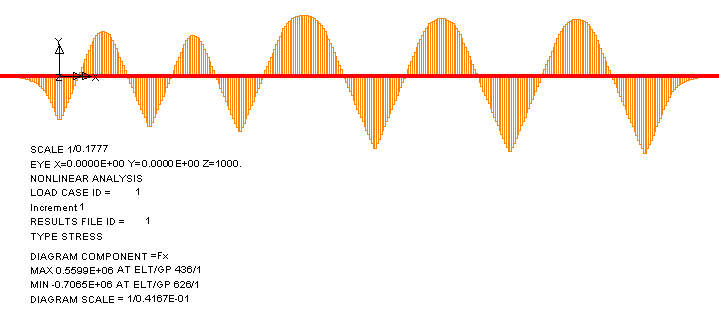
Typical axial
force results plot from LUSAS showing force in continually
welded rails from
temperature loading to the deck.
For multi-span and multi-deck structures
such as that shown above the interaction between the embankments / abutments and other decks means that the behaviour can be complex.
As an example, when considering only thermal loading on
a structure having continually welded track it is common to see a
reversal of the axial force / stress in the rails.

Whilst
not apparent from the size of the model shown, the structure illustrated above
is 325m long and consists of two decks, each with two 25m spans followed by three decks, each with three 25m spans. One pier / bearing support for each deck is represented by a restraining spring which takes account of the deflection characteristics of the pier / bearing system in accordance with UIC774-3. All of the remaining piers / bearing supports are roller supports allowing longitudinal movement of the decks. Under the effect of temperature on the structure the axial force / stress in either of the tracks / rails
can be seen to vary. This is primarily due
to the interaction between the movable and fixed structural
components.
Compatibility
with Eurocode 1
Eurocode EN 1991-2:2003
Eurocode 1: Actions on structures - Part 2: Traffic loads on bridges
encompasses significant elements of the UIC 774-3 modelling approach
when evaluating the combined response of the structure and track to
variable actions. Limiting design criteria are the same as those
specified in the UIC 774-3 code meaning that Rail Track Analysis
software can be directly employed to meet Eurocode requirements.
Dependent software options
Because of the nature of the analysis
involved, the use of the Rail Track Analysis option
requires the following options to be accessible.
See also:
Find out more
|